With Google Search data, there are a limited number of rows that will be returned from the API for each query. The Analytics Edge connector allows you to split your query into multiple API calls, joining the results into a single table for you. This is especially helpful when making annual reports — just split by month or week.
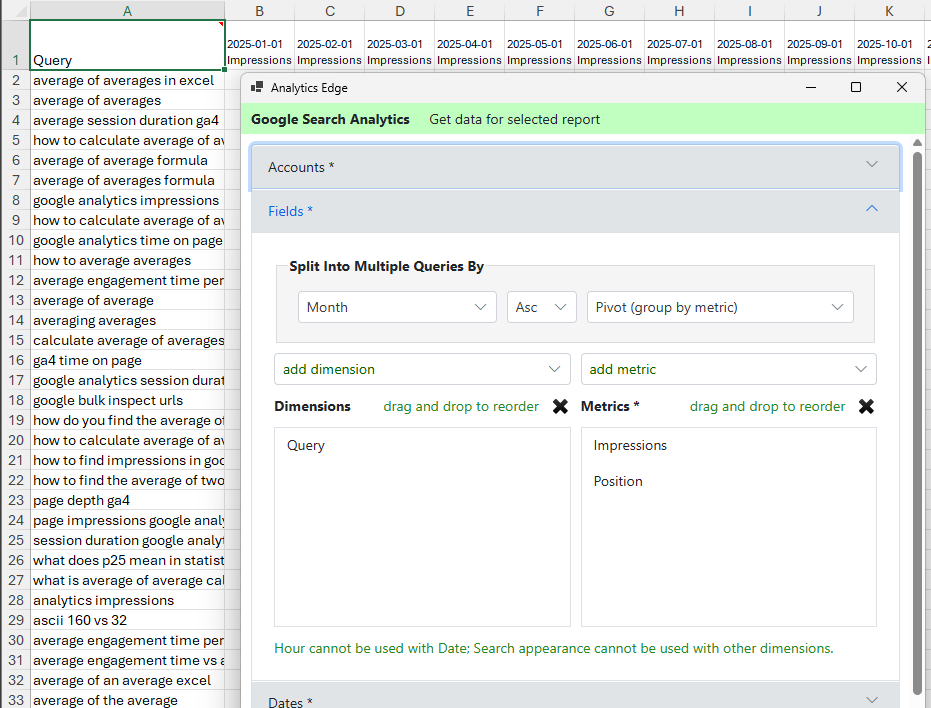
In the Fields section, select Split [into multiple queries] by Month. You can also automatically pivot the results by the date, grouped by the date or by the metrics. This quickly delivers a table o all the queries for trend reporting.
Of course, Analytics Edge has total, sort and filter functions that can arrange the data to show the trends of the top queries by clicks for the year, the queries that almost made it into the first page of results (position 10-20), or the pages with the greatest movement (peak position – worst position).
Simple transformations, step-by-step, no coding or formulas required.