 This free workbook includes 15 different SEO reports, each with an Analytics Edge macro to automate the data download and analysis. Inspired by the work of Antoine Eripret’s gsc_wrapper, this collection goes well beyond simple data dumps.
Enter a few values in the Setup sheet, then run the macro of choice to populate the respective report worksheet with your site’s results.
Download the workbook: Common SEO Analytics-2-0.xlsx
Setup
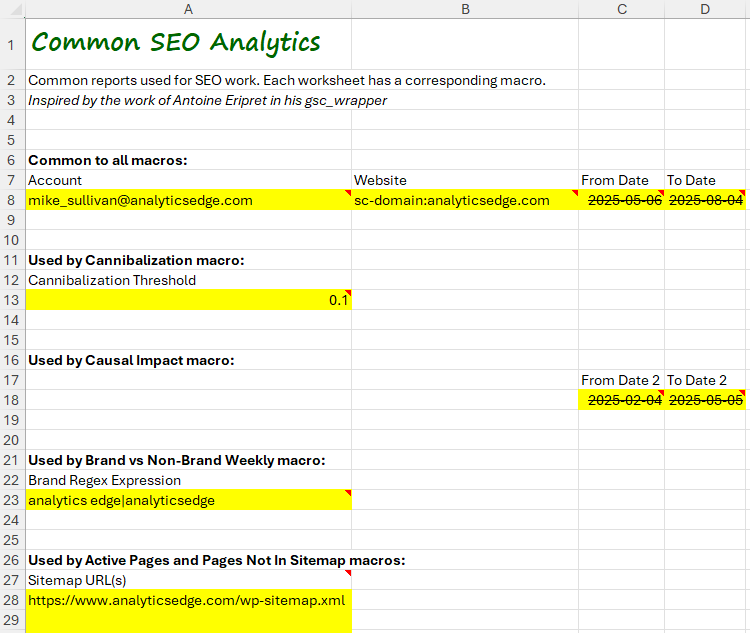 To run a report, first configure the settings in the Setup worksheet.
All reports require an account and website to be specified. Most reports also require a date range (from date / to date).
The Cannibalization reports require a threshold to be specified. Start with 0.1 (10%) and adjust up or down to include more or less content.
The Causal Impact report need a comparison date range (from date / to date). It is typically the same duration as the primary date range to make the report more meaningful.
The Brand vs NonBrand Weekly report requires a regular expression to define the brand queries. If you don’t know regex, you can simply enter your brand name here.
For Active Pages and Page Not In Sitemap reports, you should enter one or more sitemap URLs. These are typically found at https://yourdomain/sitemap.xml and should be listed in your Google Search Console sitemaps section.
The Reports
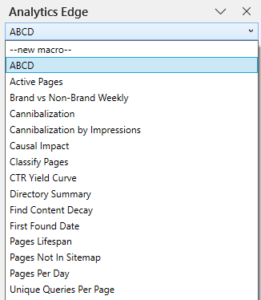
 To run a report, in the Analytics Edge task pane, select the report macro from the dropdown and click the run button.
The results will appear on a worksheet of the same name.
The list below includes links to articles with more detail about how each of the macros work.
ABCD – Classify countries by cumulative percentage contribution: A (top 50%), B (75%), C (90%), D (rest).
Active Pages – For all pages in the sitemap, get the clicks and impressions (if any).
Brand vs NonBrand Weekly – Show weekly metrics for branded vs nonbranded queries.
Cannibalization – Pages with more than 1 page ranking per query, more than 1 page with >N% of clicks for query, query with >N% of clicks for page.
Cannibalization by Impressions – Pages with more than 1 page ranking per query, more than 1 page with >N% of impressions for query, query with >N% of impressions for page.
Causal Impact – Compare clicks before/after a specific date.
Classify Pages – Demonstrates how Group function can be used to classify pages.
CTR Yield Curve – Plot CTR, Clicks, Impressions, and Keyword Count vs Position.
Directory Summary – Summarize metrics per website directory.
Find Content Decay – Pages with >100 clicks and >10% drop in clicks month-over-month.
First Found Date – Show pages most recently receiving clicks in search for the first time in the reporting period.
Pages Lifespan – How many pages appeared in search vs how many days in the reporting period they appeared.
Pages Not In Sitemap – Show pages in search that do not exist in the current sitemaps.
Pages Per Day – Show the number of pages with clicks and impressions per day
Unique Queries Per Page – Show the number of unique queries with clicks or impressions per page.
10056: analytic seo
10057: analytic seo
1074: seo search analytics
10914: search analytics
10915: search analytics
11002: seo analitic
11005: seo analitics
11005: seo analytics
11006: seo analtyics
11006: seo analytics
11008: seo analytic
11014: seo analytics
11015: seo analytics
12688: seo analytics
12698: seo and analytics
12798: seo search analytics
12799: seo search analytics
14264: search analytics
14353: seo analytic
14356: seo analtyics
14356: seo analytics
14358: seo analytic
14473: seo search analytics
15081: analytic seo
15086: analytics and seo
15087: analytics for seo
15096: analytics seo
15106: analytics seo software
15109: analytics seo tool
15111: analytics seo.com
15112: analytics seo
15112: anaytics seo
15113: analytics seo
15113: anaytics seo
15114: analytics seo
15114: anlytics seo
15115: analytics seo
15115: anlytics seo
15938: search analytics
15939: search analytics
16027: seo analitic
16148: seo search analytics
16149: seo search analytics
16686: what is seo analytics
16756: analytic seo
16757: analytic seo
16789: analytics seo
16789: anlytics seo
17715: seo analytics
18465: anlytics seo
19392: seo analytics
20106: analytic seo
20107: analytic seo
20139: analytics seo
20139: anlytics seo
21056: seo analtyics
21056: seo analytics
21174: seo search analytics
21786: analytics and seo
21798: analytics seo
21814: analytics seo
21815: analytics seo
21815: anlytics seo
24406: seo analtyics
26087: seo analytics
26088: seo analytics
26090: seo analytics
26091: seo analytics
26198: seo search analytics
26199: seo search analytics
2641: seo analytics
27756: seo analtyics
27756: seo analytics
27759: seo analytic
27873: seo search analytics
27874: seo search analytics
28512: analytics seo
28514: analytics seo
28514: anlytics seo
3356: analytic seo
4215: search analytics
4302: seo analitic
6098: seo search analytics
7656: seo analtyics
8381: analytic seo
8398: analytics seo